


We recently hosted a webinar with our friends at Yubico that addressed what most organizations are struggling with right now: how do you deploy passkeys in a way that actually works?
Derix Suartyo, Senior Solutions Engineer, ASEAN at Yubico and Justin, Founder and Director of Product at Authsignal spent an hour breaking down not just the “what” of passkeys, but the “how” that makes or breaks real-world implementations. If you’ve been thinking why your passkey rollout isn’t getting the traction you hoped for, or you’re about to start one and want to avoid the common pitfalls, this is for you.
Understanding passkeys first
Let's start with the basics because you can't deploy passkeys effectively if you don't understand how they actually work.
Passkeys are FIDO2 credentials that use cryptographic key pairs instead of passwords. When you create a passkey, you generate two keys. The public key lives on the server, the private key stays with you on your device, phone, or hardware security key. The server never sees your private key. Ever.
This architecture is why passkeys eliminate server-side breaches. When a server gets hacked, attackers only find public keys, which are useless without the matching private keys that users hold.
Derix put it perfectly in the webinar: "The best part of using the passkey is the server will never see your private key because the private key is being stored either in your computer, in your TPM, or you can sync it to the cloud. This type of architecture eliminates the server side leak."
Why this actually matters
The phishing problem is real. Bad actors have figured out it's easier to trick users than to hack systems. They spin up fake websites that look identical to the real thing, users enter their credentials, and account compromised.
Passkeys stop this. They use origin binding, which cryptographically ties the credential to the specific website. Try to use a passkey on a fake site? It simply won't work.
Beyond security, passkeys are just faster. Authentication happens in seconds with Face ID, Touch ID, or a simple PIN. No more typing complex password strings or waiting for SMS codes that may or may not arrive.
The three types of passkeys
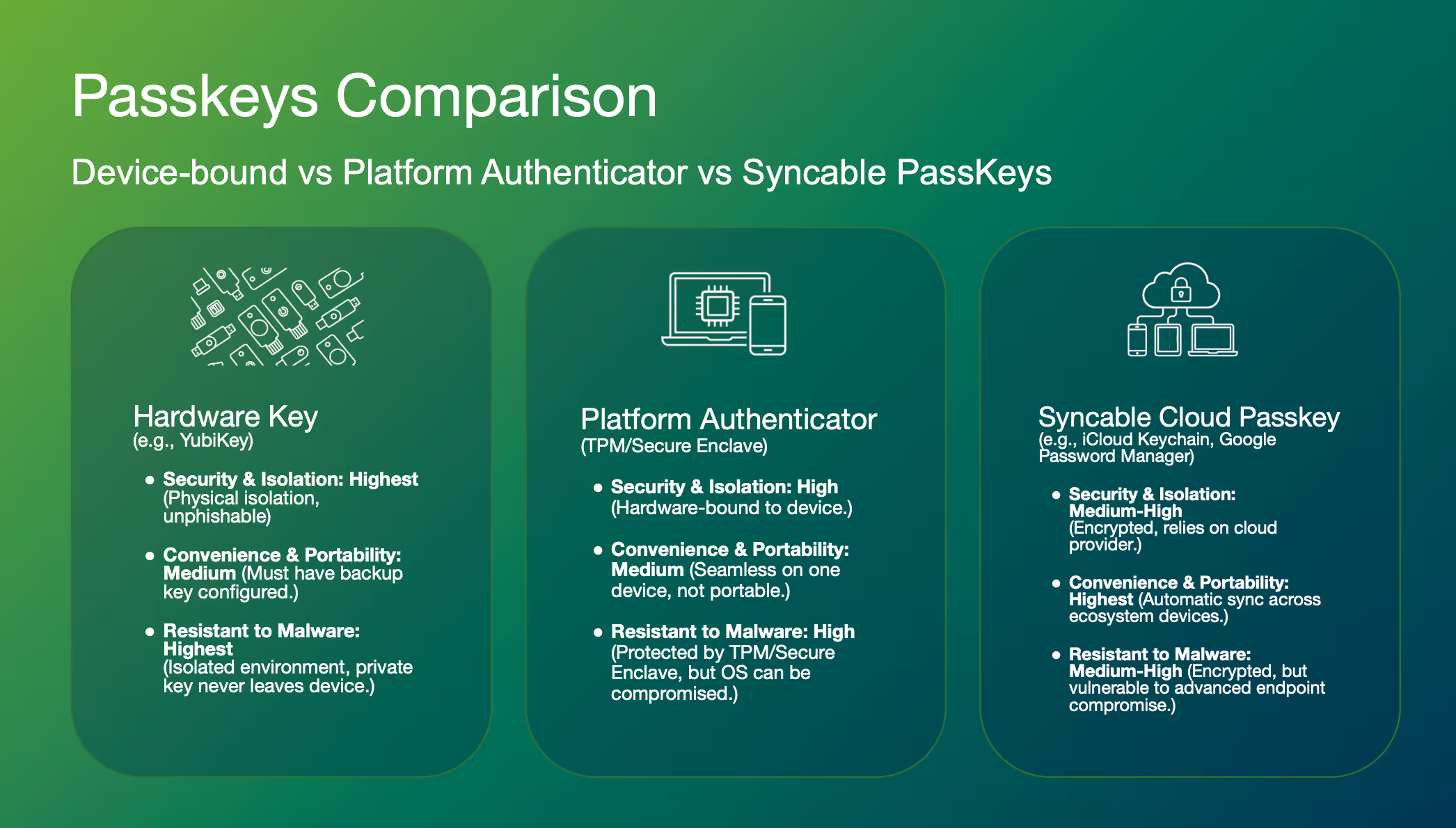
Not all passkeys work the same way, and this matters a lot for deployment strategy.
Device-bound passkeys live on hardware security keys like YubiKeys. The private key is generated in a secure element and never leaves the device. You can't export or clone it. This gives you the highest security and malware resistance, but users need to carry the physical key. Derix noted that YubiKeys have a mean time between failure of 100 years and are IP68 rated (dustproof, waterproof, crush resistant). These aren't going anywhere.
Platform authenticator passkeys are stored in your device's TPM or secure enclave. High security, seamless on that one device, but tied to that specific hardware. Lose or break the device? You're looking at expensive replacements or complex recovery flows.
Syncable passkeys work like password managers. They sync across your ecosystem devices via Google Password Manager, iCloud Keychain, and similar services. Highest convenience, but vulnerable if the cloud provider gets compromised or your device gets sophisticated malware.
Each type has its place. Justin emphasized: "Give your customers choice. Allow for all types of passkeys. The more the better."
The two-sided deployment challenge
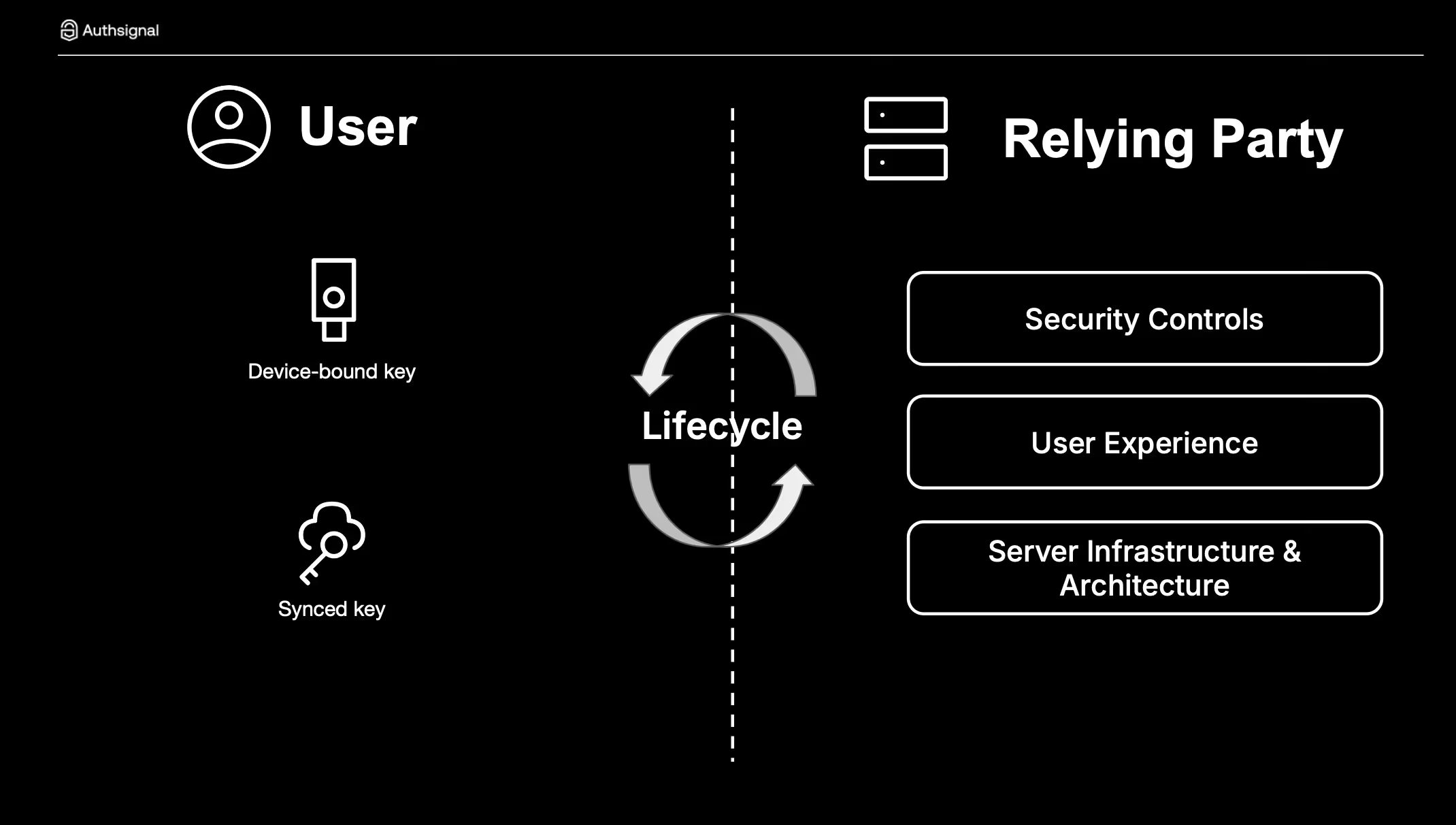
Here's where most implementations go wrong. They focus on either the technology side OR the user side. You need both.
Side one: Server infrastructure
Your FIDO2 relying party server is the foundation. Three things matter most:
Get FIDO2 certified. Authsignal is, and it matters. Certification means the server has been tested against all the edge cases and requirements you'll encounter. You don't want to discover gaps six months into a rollout.
Keep integration flexible. Look for rich APIs and SDKs that work with your existing architecture. The best implementations layer passkeys into current systems without requiring complete re-architecture.
Move fast. Justin mentioned they've seen implementations completed in a weekend when there's urgency, though 4-6 weeks including testing is more typical for large organizations.
Side two: User experience
This is where your investment becomes actual security improvement. The data is encouraging. When Authsignal's customers prompt users to upgrade to passkeys, they're seeing 60-70% adoption rates. Mobile shows even higher adoption because the OS integration is so seamless.
But you have to get three things right:
Intelligent upselling means your system understands what devices users have and prompts them appropriately. Don't ask an iPhone user to enroll an Android passkey. Use device intelligence to show relevant options at the right frequency. Keep nudging, but with empathy.
Clear messaging focuses on three value propositions: speed, phishing resistance, and security. Justin shared examples from MoneyGram showing simple, direct language: "Log in faster," "Verify fast before you send money," "Keep your profile safe." Users respond to this. Derix pointed out that ironically, "the bad actors have done a great job in terms of educating our customers why phishing is so bad." Use that awareness.
Customer choice solves the device ecosystem problem. Your users have Android phones and iPads and MacBooks. Let them enroll different types of passkeys. Let them have backups. The Air New Zealand example Justin showed demonstrated this perfectly. Users could see all their enrolled passkeys (iPassword, YubiKey, Google Password Manager) and manage them easily.
Security controls that actually work
Enable user verification. This achieves at least AAL2 (Authenticator Assurance Level 2) and leverages PIN or biometrics on the authenticator itself. Derix demonstrated this in the webinar. Users see a prompt for their security key PIN or biometric. That second factor makes a real difference.
Bind passkeys at high-assurance moments. The absolute best time to enroll passkeys is during account creation, right after you've verified identity. Don't wait until the next login. Justin was emphatic: "Don't wait for the next time that they sign in. Look at account creation as a very important step to bind a passkey."
For existing customers, bind passkeys after traditional 2FA/MFA or on a trusted device. Catch them when you have high confidence it's really them.
Secure the full customer journey, not just login. This was one of Justin's key points. Look across your entire flow and identify high-risk touchpoints. High-value transactions, account changes, password resets, call center interactions. Use passkeys for step-up authentication at these critical moments. You're protecting against MFA bypass, session hijacking, malware, and friendly fraud.
The threats passkeys help prevent at these touchpoints: "MFA Bypass, Session Hijacking, First Party Fraud/Friendly Fraud, Malware, Phishing/Social Engineering, Poor/Weak MFA Implementation, Contact/Call Center Fraud, SMS OTP Man in the middle."
Real-world results and timelines
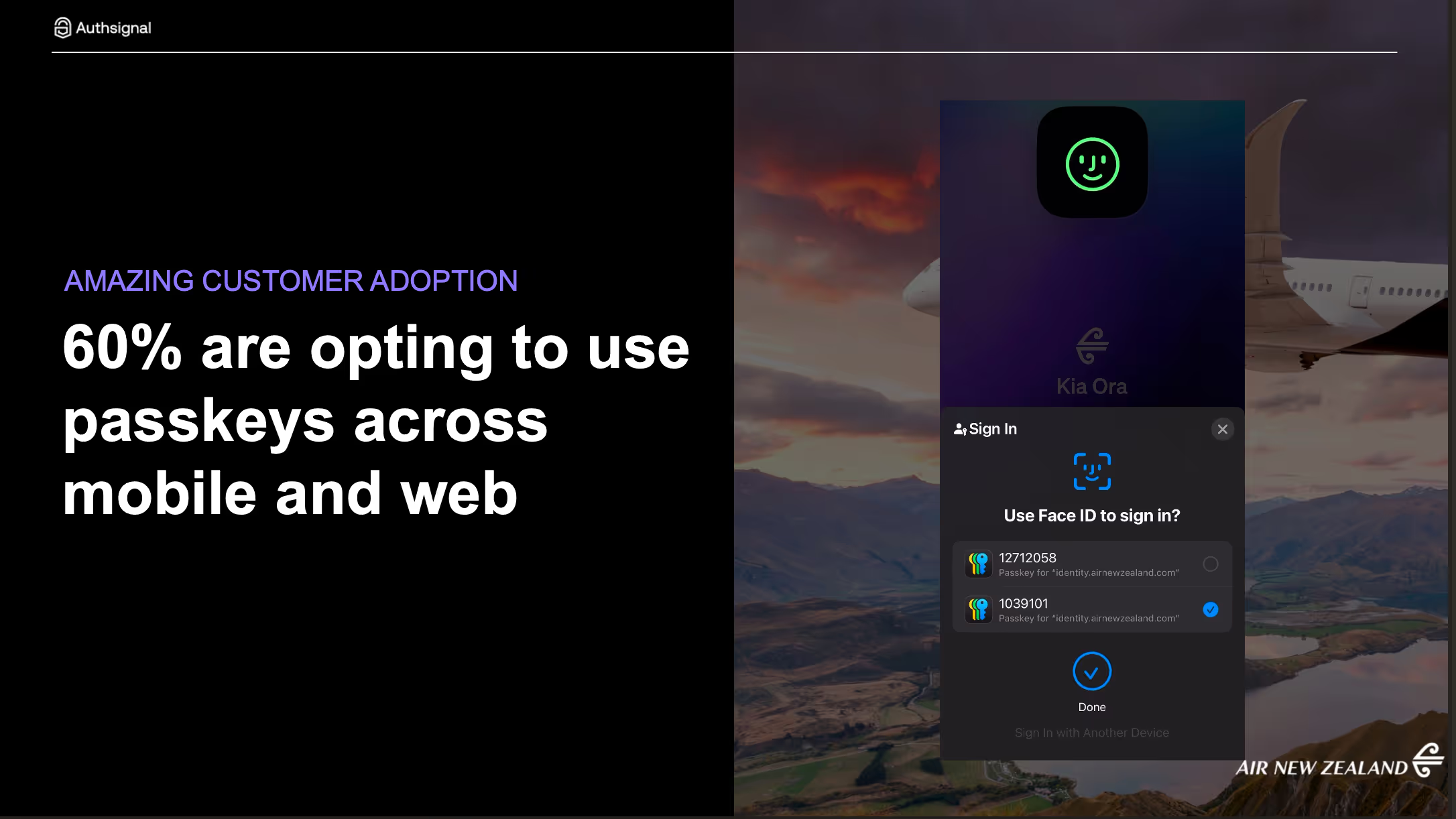
The proof shows up in adoption numbers. Authsignal customers are seeing 60%+ adoption when they implement these strategies. Air New Zealand is a great example shown in the webinar, with seamless passkey enrollment and management for their customers.
Deployment timelines? Justin's seen weekend implementations when urgency demands it. More typically, large organizations land their implementations in 4-6 weeks including testing. The key is having the right partner. As Justin said: "One of the key value drivers for us is to really help you accelerate that."
The business case
If you're still making the case internally, here are the compelling points:
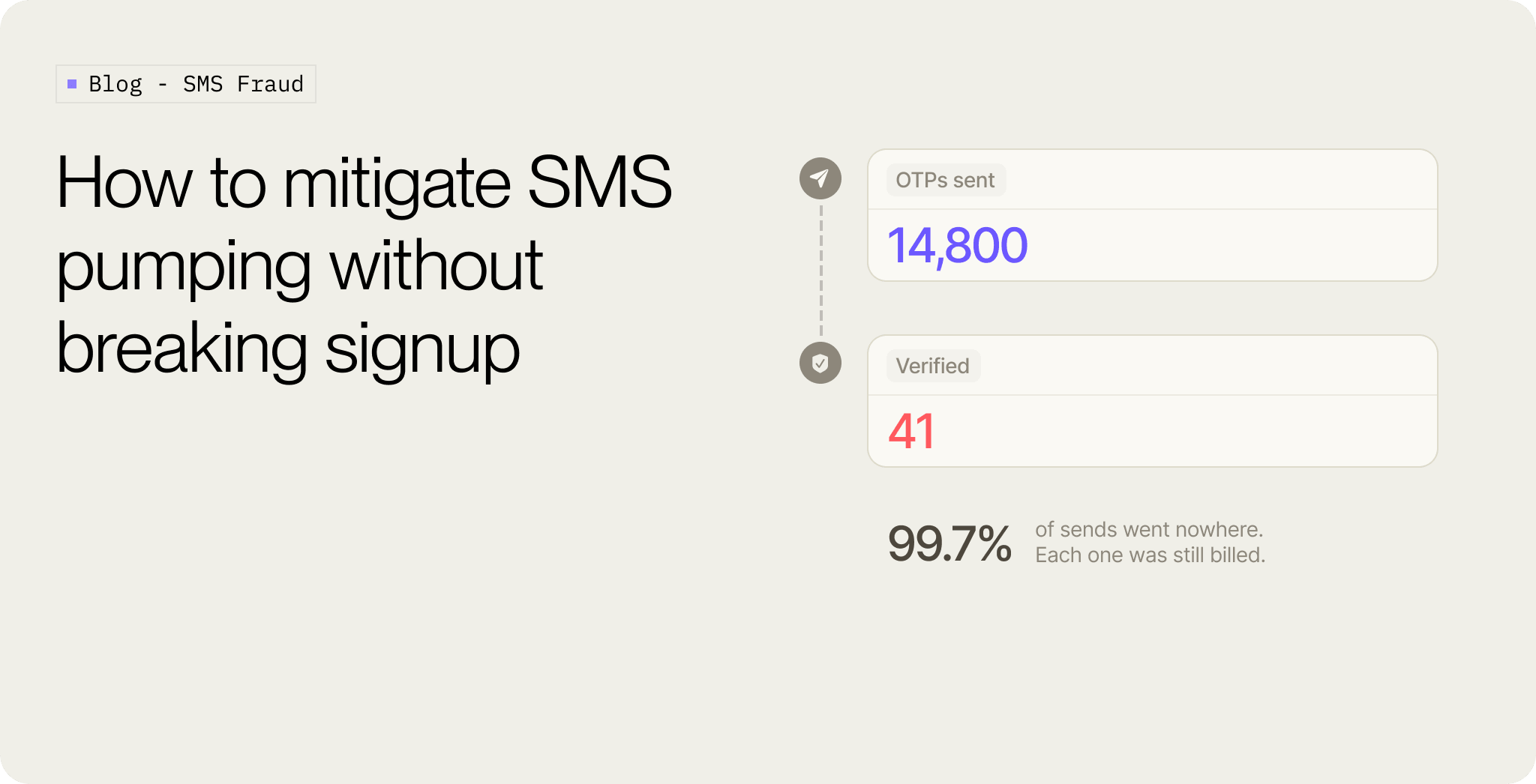
SMS is weak and expensive. You're paying for every text message while exposing users to phishing attacks and SIM swap fraud. Moving to passkeys eliminates that cost while improving security dramatically.
2026 is the year to move. Regulatory pressure is building, especially in Asia Pacific. Central banks are mandating stronger authentication. Get ahead of this rather than scrambling to comply.
Cost savings alone can justify the investment when you eliminate SMS volumes. Add in the reduced fraud, fewer account takeovers, and better user experience, and the ROI becomes clear.
What about the hard parts?
A few questions came up in the webinar that are worth addressing.
Can you export passkeys from a YubiKey? No. Derix was clear: "The passkey that is being stored in this kind of hardware security device... you cannot export or we cannot export out the private key that has already been generated within the key." This is by design. That's what makes it secure. For backup, you need a second YubiKey that you enrol separately, or offer alternative authenticator types.
What about account recovery? This is complex enough that Justin called it "another webinar on its own." The short version: blend server-side biometrics into recovery flows. Use existing KYC data, government identity systems (like SingPass in Singapore), or your established identity proofing methodologies. For consumers it's harder because of scale, but for workforce deployments you have more options.
Do passkeys enable true passwordless authentication? Yes. The beauty about the FIDO standard and passkeys is the ability to actually not require any username or password step. You can log someone in completely just from initiating the passkey challenge. It's commonly known as autofill.
How does lifecycle management work? Derix explained it's a two-sided process. On the user side, credential managers or hardware security keys manage the private key lifecycle. On the relying party side, you manage public keys, enrolment, deletion, and account recovery processes. Both sides work together to create the full lifecycle.
Moving forward
The technology is ready. The standards are mature. User awareness is growing. The real question is how quickly you can deploy.
Derix and Justin both emphasized partnering with experienced vendors. Yubico has deployed millions of hardware security keys. Authsignal has established passkey enrollments at scale across airlines, telcos, credit unions, banks, and insurance companies.
The path forward is clear:
Start with FIDO2 certified infrastructure that integrates flexibly with your current systems. Plan for a weeks-long deployment, not months. Invest heavily in user experience with intelligent upselling, clear messaging, and customer choice. Implement proper security controls including user verification, high-assurance binding moments, and step-up authentication across your full customer journey.
If you'd like to dig deeper into any of these topics, watch the full webinar or reach out to our team. We're here to help you move beyond passwords to a safer, faster authentication future.
.svg)

.png)